Portfolio
Outside-In Design
Relevant Design
Reset > Refocus > Revise:
The vision for JobLandr started as a simple tool for helping jobseekers tell the stories of their career success. From sharing that vision with the broader community of recruiters and hiring managers, the team realized their original vision actually had the potential to better serve the jobseeker by having the service support the full lifecycle of landing a new job and ultimately for a much greater ROI.
I joined the team during this pivot to a more comprehensive service.
Understanding complexity gave us the confidence to pursue simplicity.
As the researcher, my goal was to make sure that we were designing a service that was relevant to the people who would be using what we created. The steps outlined below helped us understand what and how our audience was currently getting the job done so that we could improve what was hard or unpleasant and make it easy and hopefully fun.
In the end, the product of these efforts, the detailed design for a cross-functional application integrating Candidates, Recruiters, and Hiring Managers led to the decision to focus on the simplest piece of that; helping candidates tell the story of their careers.
While the scope of the final MVP did not include several core components of the larger project that we defined through this process, we needed to understand how the cross-functional user flows worked together ensuring that the MVP would provide a relevant service.
Start Here: Talking to Stakeholders
The core team had been together for well over a year and some of the Stakeholders had been engaged with giving life to the vision of the founder for even longer. As the newest member of the team and the only one trained in UX Design, I set out to get a clear picture of as many assumptions and expectations as I could.
What had already been done?
- The original persona that the app was targeting:
- Mid-level leaders looking for new leadership roles.
- The core functionality of JobLandr:
- An online tool to help job seekers practice telling their professional stories.
- The features that had been implemented:
- A library of common interview questions
- A function for recording and playing back your answers
- A cloud-based personal storage space to access your recordings.
What had already been decided?
- New feature to extend the core functionality of recording stories.
- Professional Story Portfolio: An online, linkable and searchable collection of recordings from leaders telling stories about their successes in business.
- Story Builder: A prompt-based response form that helps a user create well-structured stories based on common, established narrative structures.
- New persona groups to target:
- Recruiters and Hiring Managers
- New Features to support recruiting activities:
- Recruiter-initiated requests for recording answers to specific questions.
- Sent directly to candidates through a secure connection.
What resources will be available?
The whole team had “day jobs” and were building the JobLandr application outside of their full-time work commitments.
- A lot of resources had been put into the current prototype that we would be building off of.
- The lead and primary engineer was focused on the server side backend. This meant that frontend changes needed to have a high value to the user.
What is Missing: What Do We Need To Learn.
The first iteration of the JobLandr application was based on research data collected through active interview techniques with participants that were engaged through the professional network of the interviewer.
The target persona in the earlier product was mid to upper-level managers who would have had experience both as interviewer and interviewee. When I reviewed what the founder had learned from those interviews it was clear that the research did produce some valuable insights. But with this being the only method used it was more susceptible to the shortcomings of user interviews.
Supplemental User Research
With the addition of Recruiters and Hiring Managers to the users that we would need to support, I suggested that we revisit some of the baseline user research typically explored through observational methods.
- How do Recruiters go about their recruiting process?
- What tools are they currently using?
- What criteria do they use to decide which candidates to move forward in the hiring process?
- What is working and not working?
- Where is the friction in the work flow?
Usability Research
This was initially the only type of research that the stakeholders assumed would be needed and prior to my stakeholder inquiry, what I anticipated would be what I would be starting right into.
This ended up being moved to Phase Two of my research plan.
The Methodology: Planning the “How”
We were well into a pandemic lockdown by the time this work was underway. Field studies were not a possibility. However, everyone had become quite comfortable in front of a webcam by then, so remote research was a viable option. Being on camera was far less of a psychological barrier than it had been pre-pandemic.
The research was segmented into three phases.
- Phase One: Contextual Inquiry
- Phase Two: Iterative High-Fidelity Prototypes Usability Testing
- Phase Three: Full Product Alpha/Beta Usability Testing
Phase 1: Contextual Inquiry
The purpose of the Contextual Inquiry is to understand the processes and systems that are currently used by recruiters. There were two methods I considered.
1) Observation
Watch/Listen to recruiters in their work environment as they engage in the recruiting process.
To do this in a remote setting it would involve an online video walk-through with the recruiter speaking out loud about the process in real-time.
- Objective observation: What & Why
- Subjective observation: Thought processes (thinking out loud)
2) Semi-Structured Interview
This would involve conversations with recruiters about their recruiting process
Objectives
- Validate our assumptions about the current state of recruiting and recruiting processes
- Ensure that we map the JobLandr use cases to real-world agency and in-house recruiting practices.
- Inform design decisions and functional requirements around delivering quantifiable value to recruiters.
Phase 2 & 3 – Usability Testing
Phase 2: High-Fidelity Interactive Prototypes
This research folds into the design and production phase of product development.
The purpose is to get feedback on the product features, user flow, and functional design solutions with medium to high-fidelity interactive prototypes prior to dedicating engineering resources to build out the functionality.
This process is an iterative process: DESIGN>TEST>REVISE>TEST
Objective
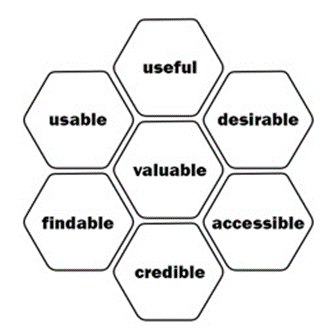
The objective is to learn whether the features that we design meet usability and value criteria so that the design solutions will give JobLandr a strong standing in the marketplace.
Phase 3: Alpha Testing | Beta Testing | A/B Testing
This phase of testing expands the usability testing to Backend/Frontend integration, data management and multi-user scenarios. This round of testing will be on the living product once the areas targeted for testing can be used in a relatively bug-free state. The purpose here is to run real-world scenarios in a functioning code base.
Observable Data
Ensure that complex workflows and tasks are achievable, that functionality is findable & discoverable, and that we are delivering delightful experiences.
Quantitative
- Time on Task
- Success/Failure rates
- Effort: # of Clicks, perceived progress
Qualitative
- Stress responses
- Subjective satisfaction
- Perceived effort or difficulty
- Desirability – (Indicator of engagement and future growth potential)
The Research Plan
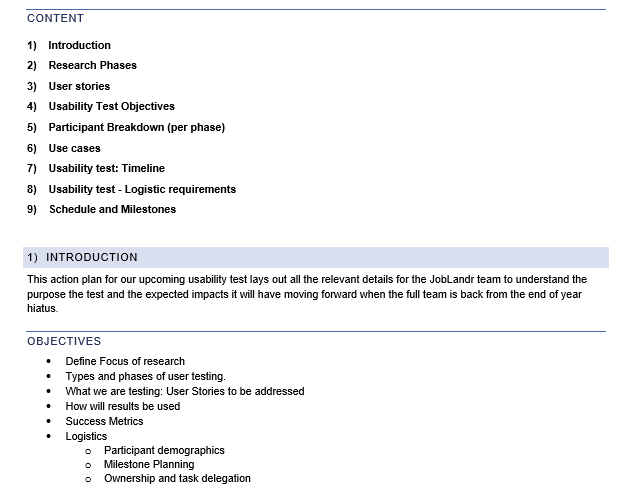
After working through many of the details highlighted above, and syncing the goals with the team, the research plan was signed off and the details for the research sessions were worked through.
Planning: Schedule & Dependencies
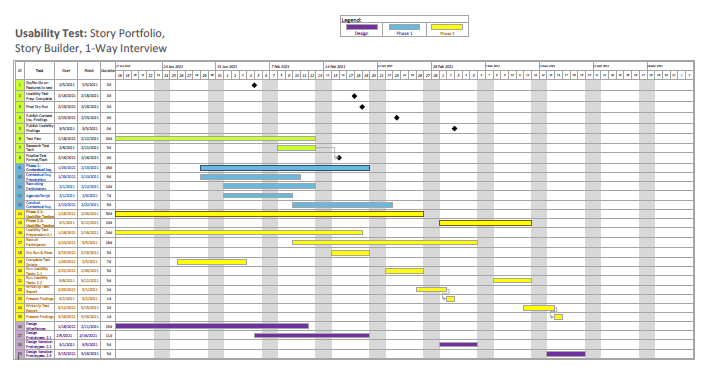
The schedule document lays out the line items comprising the end-to-end phased research plan. Milestones and UX Design phases were also captured in the document to call out dependencies.
Numerous aspects of the plan were able to be worked on in parallel.
Building Empathy: Contextual Inquiries
While the research plan was being refined we quickly set up participants for our Contextual Inquiry Research Phase. The findings from these semi-structured interviews would be needed before we could finalize the use cases that would drive the design for the application.
Working with the Product Manager and the Founder we identified key cohorts that we needed for our testing participants. Our focus would be on Recruiters.
Budget constraints and sample size
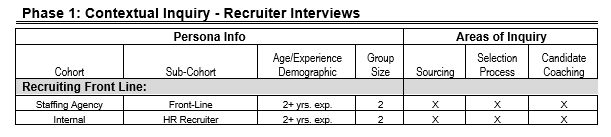
With no funding available for using a 3rd party vendor to recruit participants we accepted that we would probably be on the light side of ideal participant numbers so my tables reflect the bare minimum to get any kind of usable data.
Expectations were set early for the types of takeaways that would be valid with a small sample size.
The following is a table I created for the participant and areas of inquiry:
The Learnings: Recruiter Journey Map
The contextual inquiries were recorded enabling me to go through and log key observations, both unique characteristics of individual work flows and shared experiences.
From these notes and the resulting summary document, I created a representative recruiter journey map.
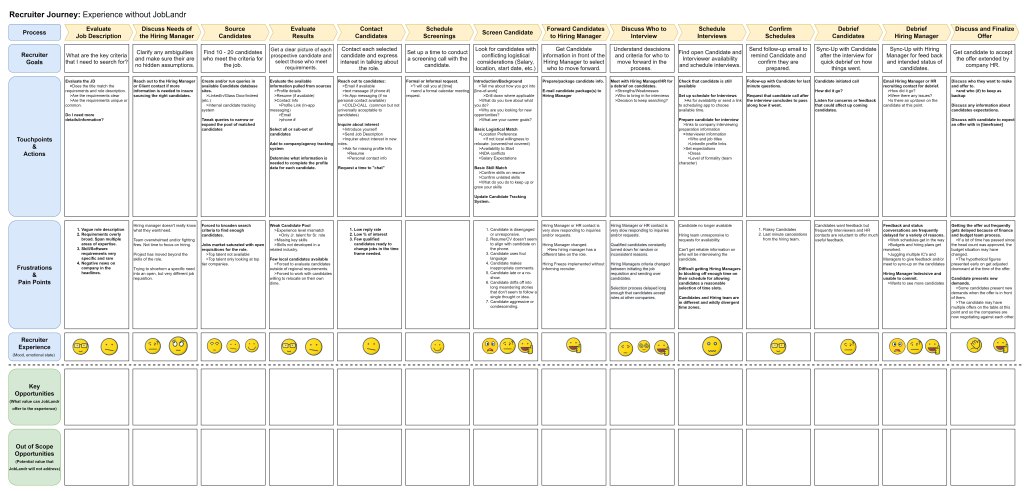
From this detailed journey map we were able to identify key opportunities, both in and out of scope. (business opportunities removed here)
Identify Opportunities: Job Seeker Analysis
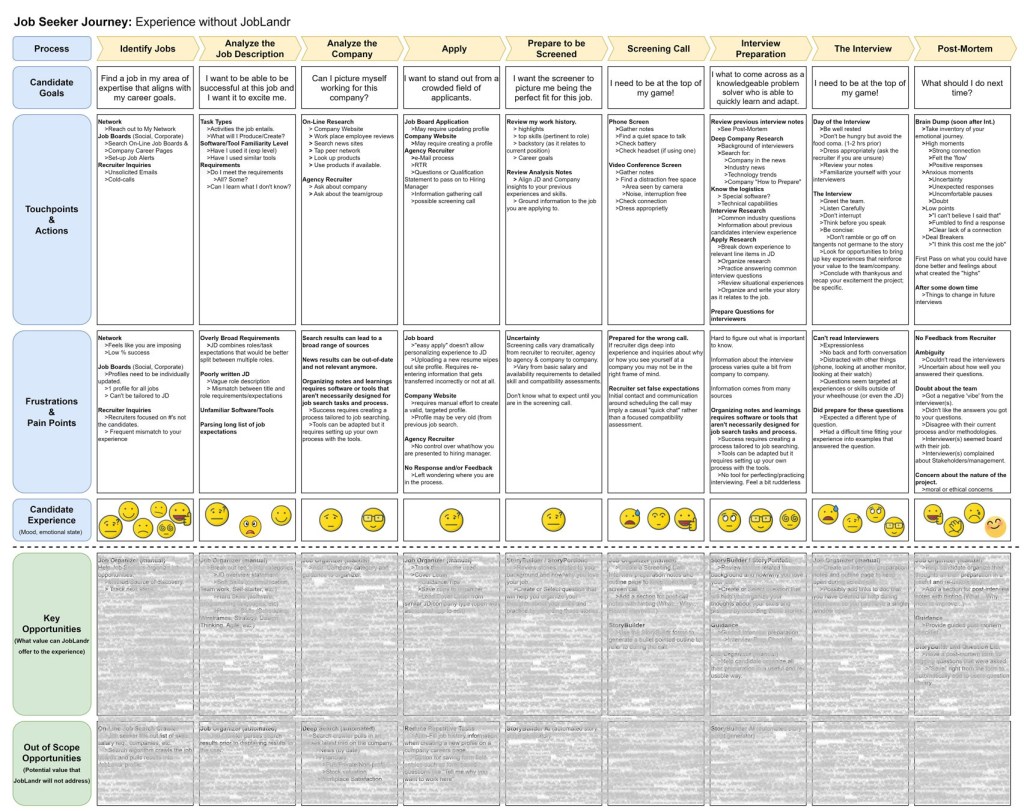
Taking the observations and insights from both the initial job seeker interview and a couple new inquiries conducted by the Product Manager and myself, I created a Job Seeker Journey Map so that we could begin putting together the User Stories that would be used in the UX and Product Design work ahead.
Value Proposition: Brainstorming Preparation
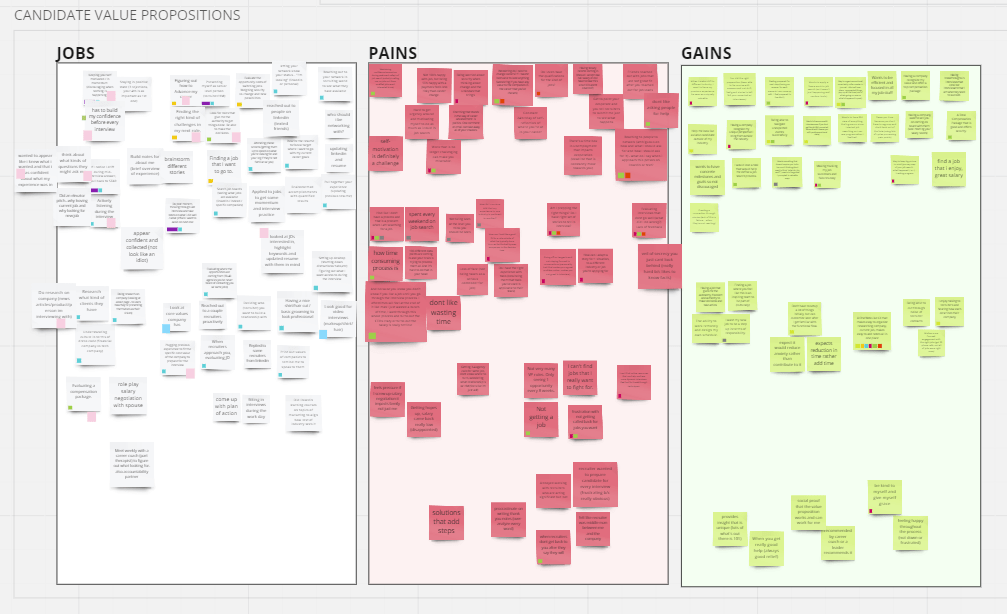
To prepare for our scheduled Ideation exercise, I created some boards on the Miro canvas we would be using and asked all participants to pre-populate the boards with notes.
We were interested in capturing three experience categories;
- Jobs that each of the user cohorts are required to engage with to achieve their goals.
- Pains that were captured in our formal research and informal anecdotal research.
- Gains in productivity and/or success that Joblandr is positioned to enable for the users.
Ideation: Team Design Brainstorming
Taking the opportunities that the Stakeholders and I had identified we opened up the discussion with a cross-functional Ideation exercise.
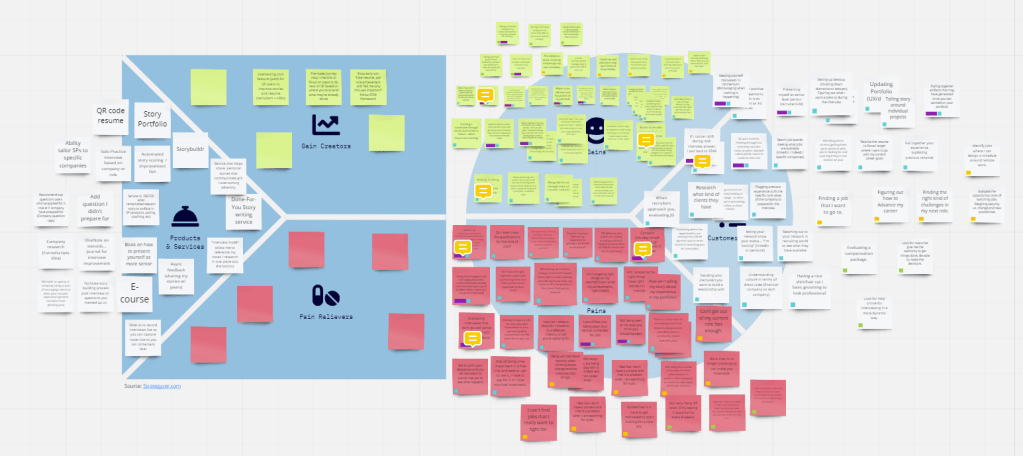
Miro: We used the online collaborative whiteboard application to run the brainstorming session.
I created three category buckets to help frame the brainstorming.
- Products & Services
- Pain Relievers
- Gain Creators
Agenda
- Exercise one: Silently review pre-meeting notes. Each participant is given time to add to or revise their notes.
- Exercise two: Move notes to the value proposition board.
- Read through all of the ideas
- Get clarification where needed
- Organize the ideas, grouping common ideas and themes
- Exercise three: Identify core products & services
- Alignment with the product vision
- Impact and Value to users
- Viability
- Cost and ROI
Analysis
The next time the Product Manager and I met we took the notes from the previous stakeholder Ideation brainstorming sessions and organized them onto a final set of boards.
- Grouped items that dealt with similar processes, features, and services.
- Identify Pain Relievers and Gain Creators
- Separate out broader Product & Service ideas from opportunities targeting specific user journey touchpoints.
Any Pain Relievers, Gain Creators, and Products & Services that were out of scope were not moved to the final boards.

B2B Value Proposition
During the exercises above there were numerous B2B opportunities that came up. At the time we put these into an “out of scope” bucket, however, we did revisit those opportunities with the team. The B2B ideation exercises followed a very similar flow.
Personas: Identifying Interdependencies
The new broader focus and cross-functional objectives of the JobLandr app introduced a lot of complex interdependencies.
- Each of the 3 personas had unique user journeys with specific touchpoints that we had identified as opportunities for improving the user experience.
- The interdependencies created an additional layer of complexity to the underlying touchpoints we had identified.
- These complex interactions between the core persona groups made it difficult to focus on any one user journey.
Experience Alignment Diagram
Issue: Complex feature dependencies
The design team and design stakeholders were having a hard time keeping features and user journeys aligned in a way that we could easily track the functionality for a specific user flow.
Partway through a design discussion, we would realize that a feature or component of the application touched on a user group that we hadn’t considered.
Quick Fix: Overlayed functional dependencies
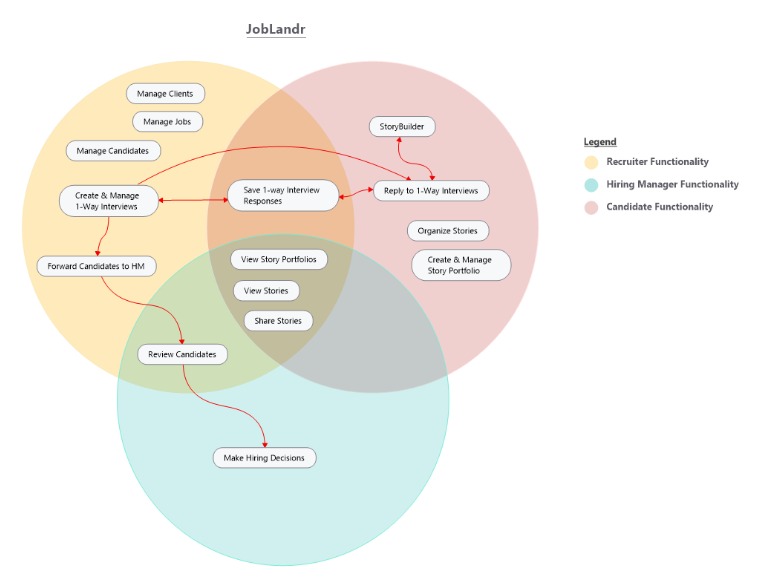
I created this Ven diagram to provide a snapshot of the user flows and functional feature components so that we could see, at a glance, where various user and feature alignments occur. This helped our planning and design discussions in several different ways.
- The diagram gave us a quick visual reference for the interdependencies of our core functional personas.
- This also helped separate out each of the core functional flows to better understand what touchpoints our app would need to address to complete any one user.
- The true scope of functionality that would be needed to support all 3 core functional personas in a single application came into focus.
The Research Plan: User Stories
With a solid set of use case opportunities defined through our Ideation session, I updated the Research Plan doc with core User Stories to capture important use cases that we would need to be designed and prototypes that would need to be built for Usability Testing.
Intersecting User Flows
To further support the cross-functional nature of Joblandr, User Stories were grouped by core feature components.
- Story Portfolio – The Jobseeker database of spoken experience narratives.
- Story Builder – The prompt-and-response tool for helping candidates tell well-structured narratives.
- Asynchronous Interviews – A recruiter-driven, secure, 1:1, asynchronous interview flow.
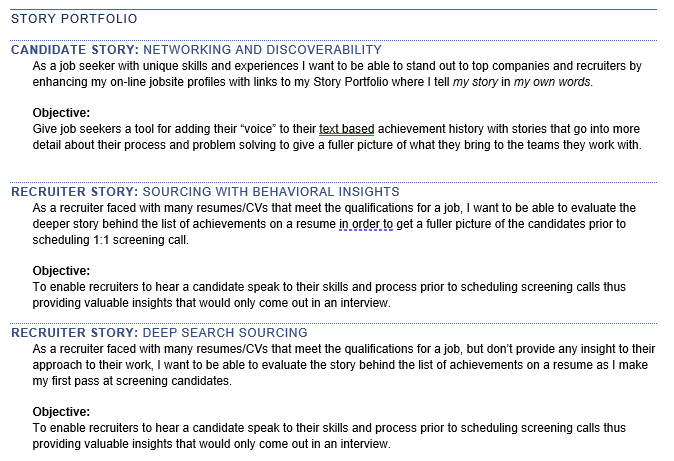
Example
The following screenshot is an example of the cross-functional nature of Joblandr User Stories.
The Research Plan: Usability Test Objectives
Usability Tests would be comprised of two parts, the first and primary part is a standard observational test where participants would be given a series of tasks to accomplish. After the hands on usability portion of the test concludes the participant will be given a Satisfaction Survey.
Usability
This usability test is measured by objective success criteria.
- Success Rate as a percentage of task completion.
- # of errors per task
- Confusion – instances where the user was lost or confused. Measure: Instances per step/task
Satisfaction
The satisfaction survey is meant to capture subjective data by asking a series of questions where the participant is shown a series of qualitative statements and asked to select the extent that they agree or disagree based on a 5-point Likert Scale.
While Usability metrics are similar between user cohorts, Satisfaction surveys use statements targeting their unique objectives for using the application. Some statements are pertinent to all users, but others will be specific to the task that they are asked to complete in the usability portion of the testing.
Examples
For the Story Portfolio User Stories outlined above here are some examples of satisfaction statements:
Candidates
- It was easy creating my Story Portfolio
- I was happy with how my Story Portfolio came out.
- Story Portfolios would give me an advantage in landing a new job.
- I would share my Story Portfolio to the public page.
- I would only share my Profile with recruiters.
- I would add StoryPortfolio links to my job applications when asked for external links to help the employer evaluate my skills.
Recruiters
- Candidate profiles provided me with the details I needed to put recorded stories in context.
- I found Candidate profiles easy to scan and find important information.
- Recorded Stories gave me insights into candidates that I don’t get from resumes and profiles alone.
- Searching the transcript database gave me usable results.
- Story Portfolios would give me an advantage in matching candidates to roles.
- Story Portfolios offered valuable insights into a candidate’s experience.
- Searching for specific skills and experience produced useful results.
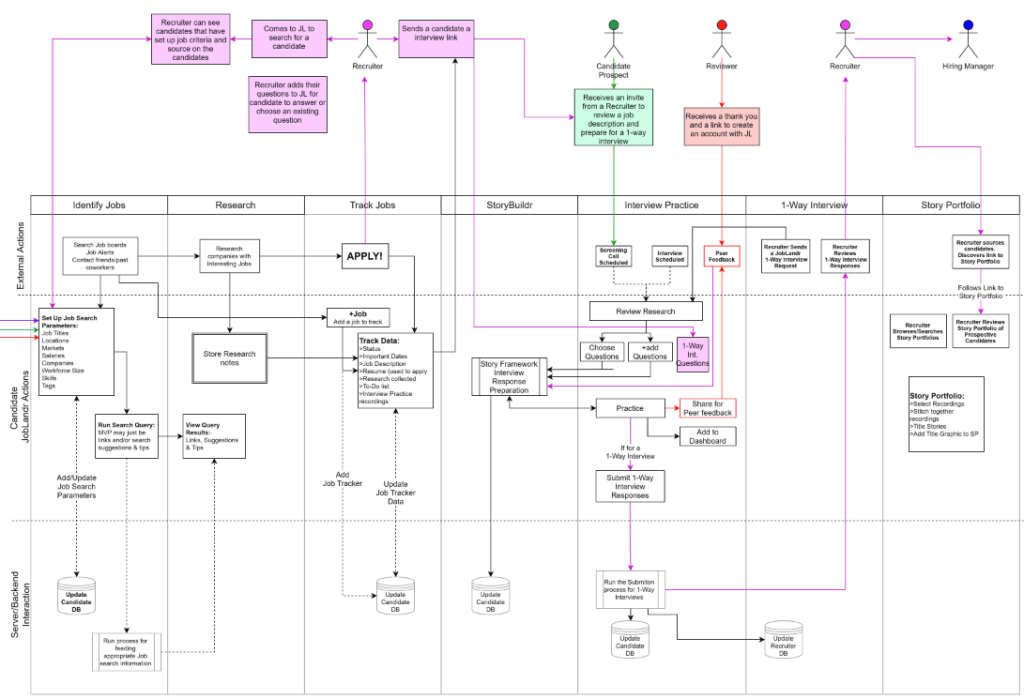
Functional Flows: Defining the Archetecture
With the core service components identified, the Product Manager and I started to diagram the user flows.
Diagrams.net: To enable remote collaboration we used the online, cloud service app, Diagrams.net (formerly Draw.io). This tool gave us a full set of diagramming tools in a synchronous editing environment.
Scope Analysis & Resource Management
With limited engineering resources available to iterate and implement the new features, we wanted to have a clearly defined user flow for each category of user.
Clarifying the Experience through Functional Flows
Functional flow diagramming allowed us to step through the full functionality that we would need to support.
- This allowed the design team to spot holes in the user experience.
- The results were a much clear picture of the scope of work required to implement the design.
- The PM was able to walk through the functional flow diagrams with the engineering team and get an accurate technical analysis of the systems and architectural requirements to build out both the backend and frontend components.
Learnings: Functional Flow Analysis
The true scope and viability of building the core components that would be needed to enable the user stories came into focus through the functional flow diagramming process.
- Each of the main functional components; Story Portfolio, Story Builder, and the Candidate Manager had complicated user flows that would be dependent on multiple new systems not yet built.
- In addition, each component had dependencies on the other core components that are part of the service.
- Many of the systems required that job-specific variables be designed into the user flow so that access to the data was controlled by the owner of the personal data.
Cross-Functional Flow Diagram: Candidates
Conclusion: Simplified MVP
As a result of this methodical, multi-step, UX Design process the Stakeholders along with the rest of the team brought the vision of the project into focus.
With a clear set of User Stories, and functional requirements to enable those Use Cases, a realistic understanding of the scope of work made the decision to focus on the original, JobSeeker components a comfortable compromise. The Product Manager was able to quickly help the team pivot to a scaled-back MVP.
 Portfolio