Portfolio
Outside-In Design
Multi-Device Support
Syncing Player Progress Across Devices
Objective:
In an game app where a players progress is building both investment and value in their experience, the ability to sync that progress across any of their devices. Whether a player is playing on their phone on the go and on a larger tablet at home or the player is just upgrading their device, players want a seamless experience and syncing that data needs to happen with a minimum of effort (if not entirely in the background).
With the holiday gift giving season approaching this project was given a high priority in order to enable our players who received new devices in December a seamless experience in transitioning their game experience to the new app.
Currently we would need users to call customer service to transfer their account from one phone to another. Even then Customer Service has not been the tools to easily do it on their own.
KPI’s
- Reduction in CS calls to transfer game progress to new devices.
- Increase in sessions per day and DAU/MAU
- This would indicate that device convenience (availability) plays a factor in frequency of play.
Competitive Analysis
The first step was looking at our competitors to determine if and how they provide the ability to sync their progress. At a minimum any of the top profitable social casino games need to account for players getting new devices either through loss or upgrading.

Player Goals:
- As a player with a new device I want to be able to pick up my new device and have my game progress right where I last played.
- My inability to pick up where I left off will make me put the game aside and re-evaluate the value of the game experience.
- If we don’t provide an easy way for the player to pick up where they left off they may move on to other apps that have provided a seamless experience.
Approach:
Cross-functional collaboration
This feature was going to require platform, client and server integration so all three engineering groups were involved in working with design to come up with a solution that would allow for the simplest solution that would meet the customers expectations.
- Solution should require as little user involvement as possible.
- Fully sync’d player progress; Levels, Purchases, Achievements
- Error resistant – recoverable from syncing errors
Functional Flow:
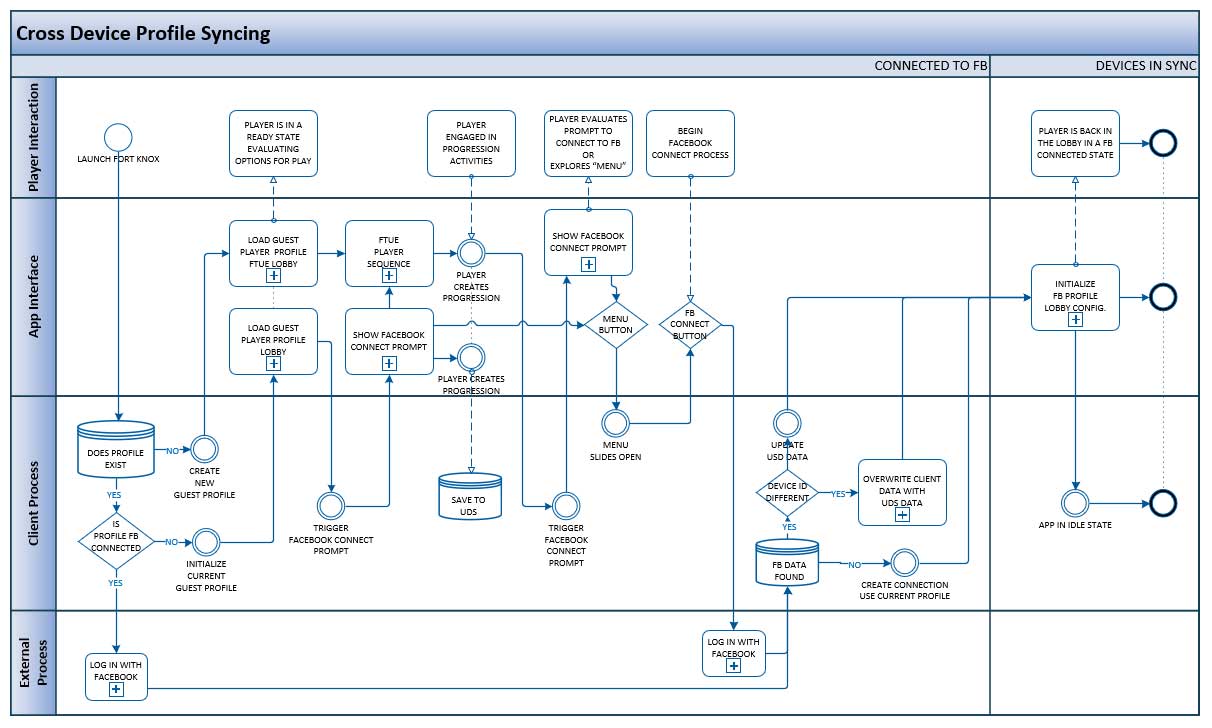
The following flow was developed collaboratively with the engineering team.
- The first pass at this process alignment map quickly aligned the teams around the experience we wanted to deliver.
- The alignment aspect of this diagram allowed the engineering lead to quickly see technical problems that would need to be solved and enabled rapid iteration.
- Stakeholders were able to use this functional flow to help them scope and resource the feature.
Prototype:
From the initial functional flow I was able to build an interactive prototype to help stakeholders fully grasp the experience we were trying to deliver to the user.
- The prototype would help us understand the flow from a user perspective.
- This also enabled the team to see where states would affect the functional flow and allowed us to design around those cases.
- Because we were adding a feature to an existing app and was able to use a fair amount of existing UI elements, I create high fidelity interactive prototypes to get a better feel for how the new feature integrates with the live app.
- This would typically help stakeholders quickly come into a alignment with our solution.
LINK: Device Syncing Prototype
NOTE: As with most of my prototypes I try to build any optional variations into the prototype so they can be easily compared. I use the landing page to launch the prototype variants with the proper global variables set to give the experience specific to that set of options.
 Portfolio